Iqbal´s DLQ Help

GitLab Runner With Caching - OCI Object Storage

Okay, this one is a quick share for how to set up your own GitLab Runner using the cluster we have deployed previously. in Opting for Dual-State In Terraform OCI OKE

We will also be using the OCI Object Storage as a caching layer for our builds.

Prerequisites

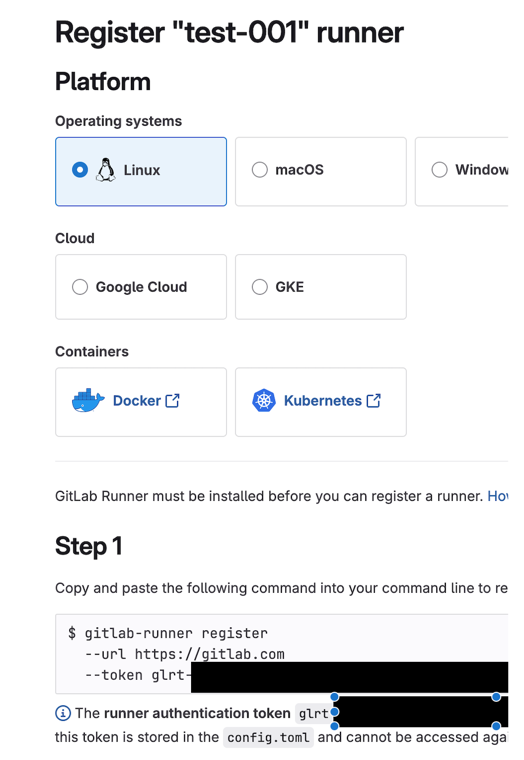
Start by creating a runner in your repo's UI. This step is important to get the registration token needed to register the runner

Setting up the GitLab Runner

Under:

CI/CD Settings -> Runners -> create a new runner:

new_runner.png

Save the token somewhere safe as we will need it later

Generate S3 Compatible Credentials for OCI Object Storage

To use OCI Object Storage as a caching layer, we need to create S3 compatible credentials.

  1. Go to the OCI Console.

  2. Navigate to Identity -> Domains.

  3. Select your domain.

  4. Go to the User management tab.

  5. Select your user.

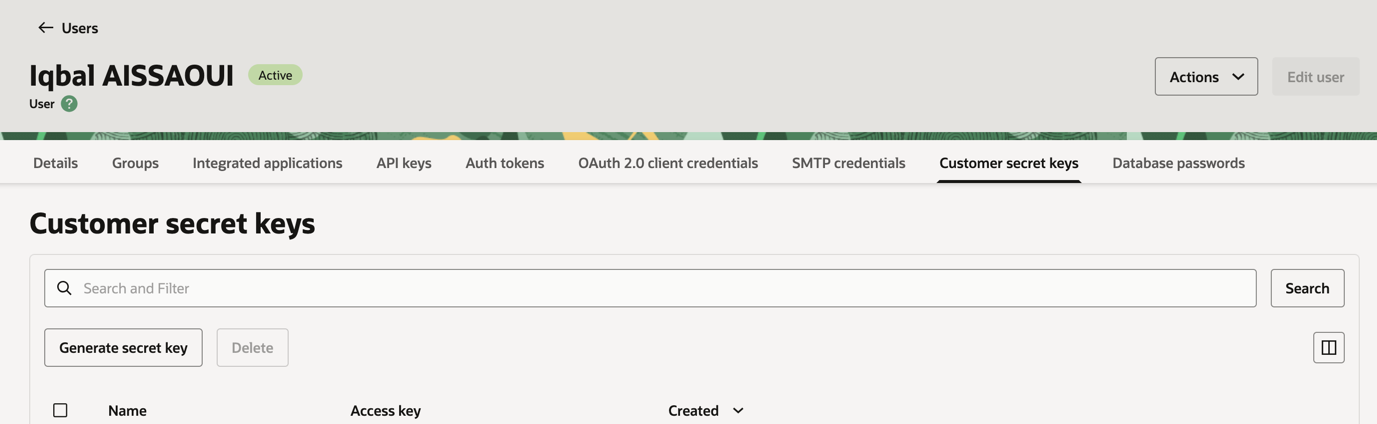
  6. Create a key pair for S3 compatible access under the Customer secret keys tab:

customer_secret_keys.png

Create a new Policy in OCI IAM

We'll use Terraform to create a new policy that allows access to Object Storage for our GitLab Runner. Here is an example policy you can use, replace <your-namespace> and <your-bucket-name> with your actual namespace and bucket name.

resource "oci_identity_policy" "object_storage_lifecycle_policy" { name = "object-storage-lifecycle-policy" description = "Allow Object Storage service to manage objects for lifecycle policies" compartment_id = var.TENANCY_OCID statements = [ "Allow group OCI_Administrators to manage buckets in tenancy", "Allow group OCI_Administrators to manage objects in tenancy", format("Allow service objectstorage-%s to manage object-family in tenancy", var.REGION) ] }

Create OCI Object Storage Bucket

You can create the bucket using Terraform as well. We will use depends_on to ensure the policy is created before the bucket.

data "oci_objectstorage_namespace" "os_ns" {} resource "oci_objectstorage_bucket" "ci_cache_bucket" { compartment_id = var.TENANCY_OCID name = "ci-cache" namespace = data.oci_objectstorage_namespace.os_ns.namespace access_type = "NoPublicAccess" storage_tier = "Standard" versioning = "Disabled" depends_on = [oci_identity_policy.object_storage_lifecycle_policy] }

And you can attach lifecycle policies as needed. Here is an example that deletes objects after 60 days:

resource "oci_objectstorage_object_lifecycle_policy" "cache_cleanup_policy" { bucket = oci_objectstorage_bucket.ci_cache_bucket.name namespace = data.oci_objectstorage_namespace.os_ns.namespace rules { name = "delete-objects-after-60-days" action = "DELETE" is_enabled = true time_amount = 60 time_unit = "DAYS" } }

Deploying the GitLab Runner, with Terraform

Now that we have the bucket and policy set up, we can deploy the GitLab Runner using Terraform.

resource "kubernetes_namespace" "runner_ns" { metadata { name = var.gitlab_runner_namespace } } resource "helm_release" "gitlab_ci_runner" { name = "ci-runner" repository = "https://charts.gitlab.io" chart = "gitlab-runner" namespace = kubernetes_namespace.runner_ns.metadata[0].name values = [ <<-YAML gitlabUrl: https://gitlab.com/ unregisterRunners: true concurrent: 5 rbac: create: true runners: name: k8s-ci-runner executor: kubernetes runUntagged: false locked: true tags: ["cloud-runner"] config: | [[runners]] [runners.kubernetes] namespace = "{{ default .Release.Namespace .Values.runners.jobNamespace }}" image = "alpine" helper_image = "registry.gitlab.com/gitlab-org/gitlab-runner/gitlab-runner-helper:arm64-v18.4.0" [runners.cache] Type = "s3" Path = "gitlab_runner" Shared = true [runners.cache.s3] BucketName = "${oci_objectstorage_bucket.ci_cache_bucket.name}" BucketLocation = "${var.REGION}" ServerAddress = "${data.oci_objectstorage_namespace.os_ns.namespace}.compat.objectstorage.${var.REGION}.oraclecloud.com" AccessKey = "${var.s3_key}" SecretKey = "${var.s3_secret}" YAML ] set_sensitive { name = "runnerToken" value = var.gitlab_runner_authentication_token } depends_on = [kubernetes_namespace.runner_ns, oci_objectstorage_bucket.ci_cache_bucket] }

You can see the token generated earlier passed as a variable to the Terraform script under gitlab_runner_authentication_token and the key and secret for S3 compatible access as s3_key and s3_secret.
Source Code

08 March 2026