# OkHttp3 Scripting
Postman can help you generate HTTP call code in Java, cURL, and many other languages. This is a fast way to perform scripting in Java, especially for batch processing requirements.
One use case I encountered involved firing 50,000+ HTTP calls while reading input from a CSV file. While such use cases are often better suited for SQL or PL/SQL, you may not always have access to the persistence layer.
## Example: Using Public APIs
Let's test with a public API, such as [URLhaus Recent URLs API](https://urlhaus-api.abuse.ch/v1/urls/recent/).
## Dependencies
Add `okhttp3` and `commons-lang3` (for `ExceptionUtils`) to your `pom.xml`:
```XML
com.squareup.okhttp3
okhttp
4.12.0
org.apache.commons
commons-lang3
3.12.0
```
## Code Snippet from Postman
You can generate the following OkHttp3 code snippet using Postman:
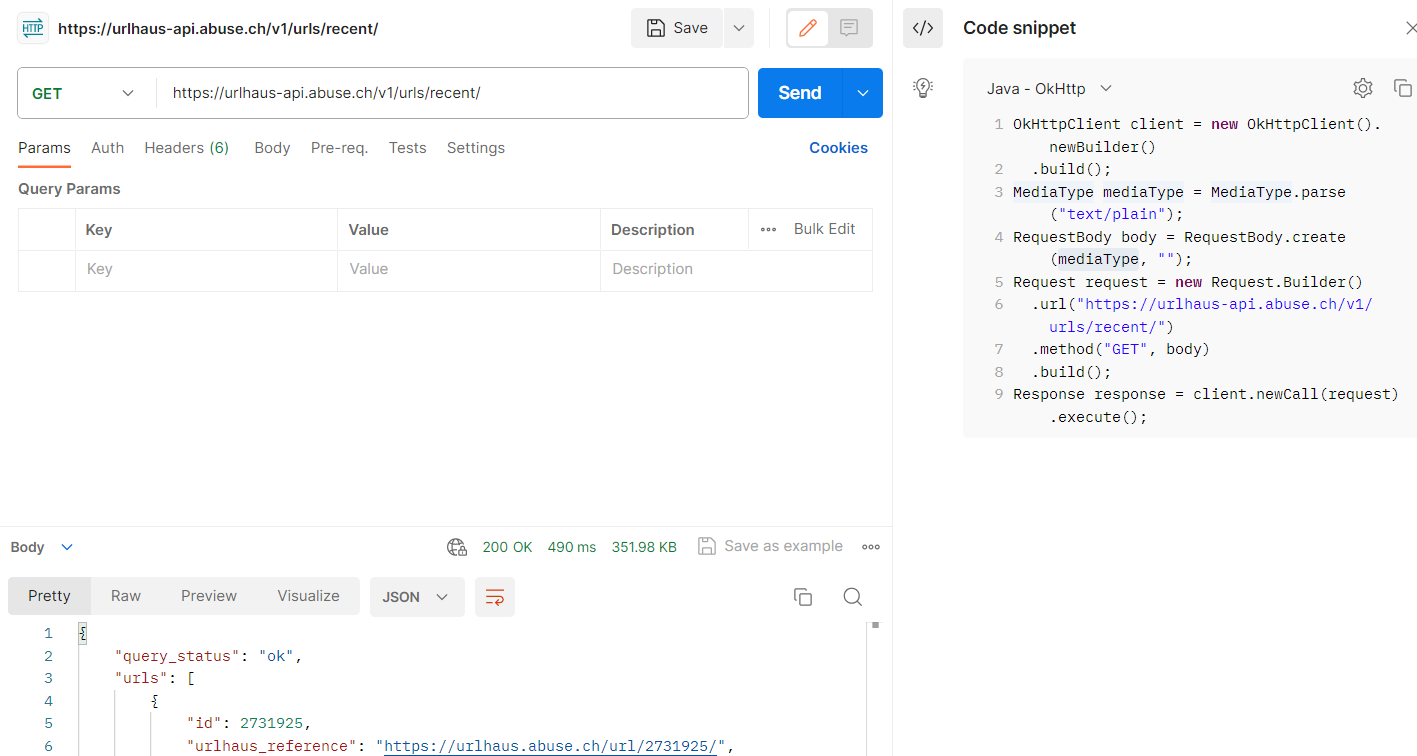
```JAVA
OkHttpClient client = new OkHttpClient().newBuilder()
.build();
MediaType mediaType = MediaType.parse("text/plain");
RequestBody body = RequestBody.create(mediaType, "");
Request request = new Request.Builder()
.url("https://urlhaus-api.abuse.ch/v1/urls/recent/")
.method("GET", body)
.build();
Response response = client.newCall(request).execute();
```
## Processing a File with `Files.lines`
Let's process a file in the format `A;B;C`, where we only need columns `B` and `C`. Here's an example input:
```TEXT
xxxx;B0;C0
xxxx;B1;C1
xxxx;B2;C2
xxxx;B3;C3
```
### Batch Processing Code
```JAVA
// Append to output file names to distinguish multiple runs
LocalDateTime ldt = LocalDateTime.now();
DateTimeFormatter formatter = DateTimeFormatter.ofPattern("yyyy-MM-dd--HH-mm-ss");
public void batch() throws IOException, URISyntaxException {
Files.lines(Path.of(getClass().getResource("/input.txt").toURI()))
.parallel()
.forEach(l -> {
try {
this.process(l.split(";")[1], l.split(";")[2]);
} catch (URISyntaxException | IOException ex) {
log.info("IO exception trace: " + ExceptionUtils.getStackTrace(ex));
ex.printStackTrace();
}
});
}
```
### `process` Method
```JAVA
void process(String x, String y) {
log.info("Processing x: " + x + ", y: " + y);
try {
OkHttpClient client = new OkHttpClient().newBuilder()
.build();
MediaType mediaType = MediaType.parse("text/plain");
RequestBody body = RequestBody.create(mediaType, "");
Request request = new Request.Builder()
.url("https://urlhaus-api.abuse.ch/v1/urls/recent/")
.method("GET", body)
.addHeader("x", x)
.addHeader("y", y)
.build();
try (Response response = client.newCall(request).execute()) {
log.info("Current response: " + response);
String respBody = response.body() == null ? "" : response.body().string();
if (response.isSuccessful()) {
String str = "xxxx;" + x + ";" + y + ";" + response + ";" + respBody + System.lineSeparator();
log.info("Operation succeeded for x: " + x + ", y: " + y);
Files.writeString(Paths.get("logs", "success-" + formatter.format(ldt) + ".txt"), str, StandardOpenOption.APPEND, StandardOpenOption.CREATE);
} else {
String str = "xxxx;" + x + ";" + y + ";" + response + ";" + respBody + System.lineSeparator();
log.info("Operation failed for x: " + x + ", y: " + y);
Files.writeString(Paths.get("logs", "failure-" + formatter.format(ldt) + ".txt"), str, StandardOpenOption.APPEND, StandardOpenOption.CREATE);
}
}
} catch (Exception ex) {
log.info("Operation failed for x: " + x + ", y: " + y + ", exception: " + ex.getMessage());
log.info("Exception trace: " + ExceptionUtils.getStackTrace(ex));
String str = "xxxx;" + x + ";" + y + ";" + ex.getMessage() + System.lineSeparator();
Files.writeString(Paths.get("logs", "failure-" + formatter.format(ldt) + "-" + ".txt"), str, StandardOpenOption.APPEND, StandardOpenOption.CREATE);
ex.printStackTrace();
}
}
```
### Best Practices
> **Tip:**
> PS: Remember, this is scripting with Java for quick actions. Follow these best practices:
>
>
>
> * Avoid string concatenation with the `+` operator.
>
> * Avoid catching the parent `Exception` class. Handle exceptions properly.
>
> * Avoid repeating code blocks, such as file I/O operations.
>
> * Sanitize input, as a 50K+ input file is unlikely to be clean.
>
> * Use verbose logging to understand what went wrong.
>
> * Handle `NullPointerException`s (NPEs).
>
> * Ensure your API gateway, backend, and API key can handle the expected load.
## Calculating Queries Per Second (QPS)
Assuming:
* An average query duration of 400ms.
* Your laptop has 10 cores.
Each thread in the common thread pool can handle 2.5 queries per second (1s / 400ms). With 10 cores, you can send approximately 25 QPS (2.5 * 10).
To process 50,000 queries at 25 QPS:
```
50,000 queries / 25 QPS = 2,000 seconds ≈ 34 minutes
```
Ensure your system can handle this load!
> **Tip:**
> References
>
>
>
> [URLhaus Recent URLs API](https://urlhaus-api.abuse.ch/v1/urls/recent/)