# Native Image (Spring Boot 3+) - Paketo Buildpacks Route
> **TL;DR**
> Migrate a Spring Boot 3+ app to GraalVM Native Image using the Paketo Buildpacks route: set up the native Maven profile, run a JVM-AOT instrumented Docker build to collect trace agent metadata, then feed that metadata into the native image build to resolve reflection, resource, and JNI issues.
This guide details the process of migrating a Spring Boot application to GraalVM Native Image.
The application integrates Spring Cloud and Spring Cloud AWS. Be prepared for potential runtime errors and the need for manual adjustments during the image-building process.
For this guide, we will be using the native Paketo buildpacks to build the native image.
## Upgrading to a Native-Compatible Setup
First, upgrade to the latest versions of Spring Boot 3.x.x, Spring Cloud, and Spring Cloud AWS on which the application depends.
Make sure to check the compatibility matrix for these dependencies:
| Dependency | Used version | Compatibility Matrix | Comments |
| --- | --- | --- | --- |
| Java | 23.0.2+9 | N/A | |
| Liberica-NIK (Native Image Builder) | Liberica-NIK-24.1.2-1 | N/A | Native Image Builder |
| GraalVM (Trace Agent Metadata Collection) | GraalVM for JDK 23.0.1 | N/A | Used as a JVM for instrumenting with Trace Agent |
| Spring Boot | 3.4.2 | N/A | |
| Spring Cloud | 2024.0.0 | [Spring Cloud Project](https://spring.io/projects/spring-cloud) | |
| Spring Cloud AWS | 3.3.0 | [Spring Cloud AWS GitHub](https://github.com/awspring/spring-cloud-aws) | |
In this case, upgrading was straightforward since the Spring Boot 2 to 3 upgrade was already completed.
Simply update the versions and run integration and regression tests to ensure the service remains intact.
## Enable Native Support
Now that you're running on compatible versions, set up your project for Ahead-of-Time (AOT) processing and native image building.
If you are using the Spring Boot parent starter, a native profile is already included. The following setup demonstrates manually adding the profile in case you have a custom parent POM.
### Spring AOT
#### Introduction
The goal of Spring AOT Compilation is to provide GraalVM with the necessary metadata for Spring's dynamic features.
These features, previously processed at runtime, need to be initialized during compile time for native images.
AOT processing provides:
1. Source code for bean definitions at build time.
2. Bytecode for dynamic proxies.
3. Hint files for:
* Reflective access metadata.
* Serialization metadata.
* Resources to include.
* Proxy configuration.
#### Handling Profiles and Conditional Bean Creation
Feeding all dynamic aspects into GraalVM during native image build would undermine the goal of maintaining a clean runtime:
* It increases size, negating benefits like reduced footprint and optimization.
* It compromises a reduced attack surface, as the runtime wouldn't be restricted to a profile or tailored for specific properties.
As a result, building native images introduces restrictions on profiles and conditional bean loading (e.g., `@Conditional`). The application context during AOT compilation mirrors the build-time configuration.
#### In Practice
We covered Spring AOT in detail in [Road to Native Image for Spring Boot 3](road-to-native-image-spring-boot-3.html#native-profile).
Let's jump directly to the profile that we are using for this build.
As with the previous build, we will be manually providing the profile in the POM because we use a custom parent.
> **Tip:**
> References
>
>
>
> You can get the default native profile directly from the Spring parent project and build from there: [Spring Boot Starter Parent POM](https://repo1.maven.org/maven2/org/springframework/boot/spring-boot-starter-parent/3.4.2/spring-boot-starter-parent-3.4.2.pom)
Default profile from the Spring parent project:
```XML
native
org.apache.maven.plugins
maven-jar-plugin
true
org.springframework.boot
spring-boot-maven-plugin
process-aot
process-aot
org.graalvm.buildtools
native-maven-plugin
${project.build.outputDirectory}
22.3
add-reachability-metadata
add-reachability-metadata
```
> **Note:**
> Specify target profiles as shown above. For example, the "local" profile provides quick feedback from the generated binary.
You can run only Spring AOT with:
```SHELL
mvn spring-boot:process-aot
```
Inspect:
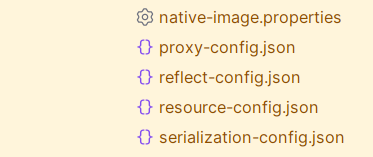
* GraalVM hints under `target/spring-aot/main/resources/META-INF/native-image/com.myapp.business/myapp/*`:
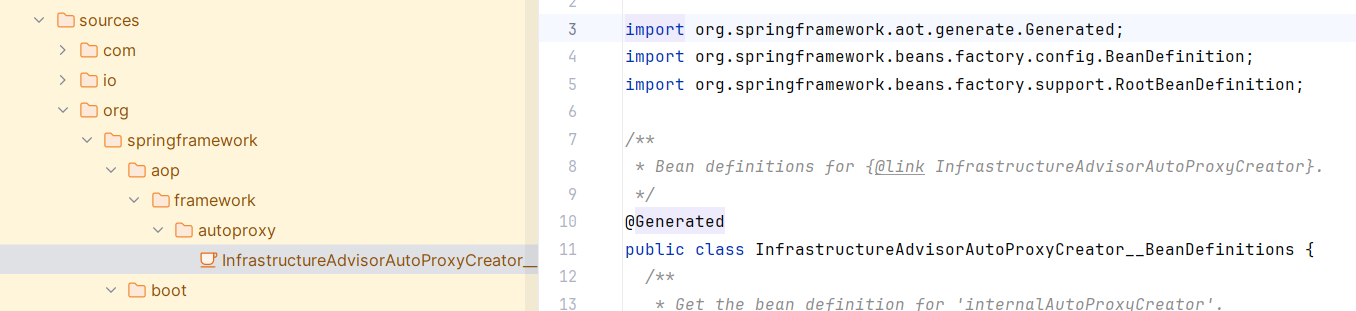
* Generated source code under `target/spring-aot/main/sources`:
> **Warning:**
> Common Pitfalls
>
>
>
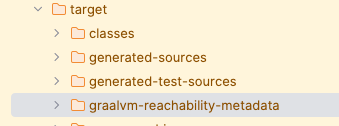
> Make sure that you are actually getting the added reachability metadata:
>
>
>
> Check your target folder for:
>
>
>
> 
>
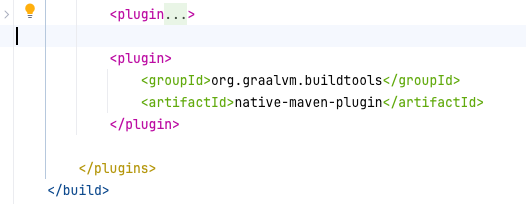
> The native Maven plugin should be present in both the native profile and your plugins section under build:
>
>
>
> 
>
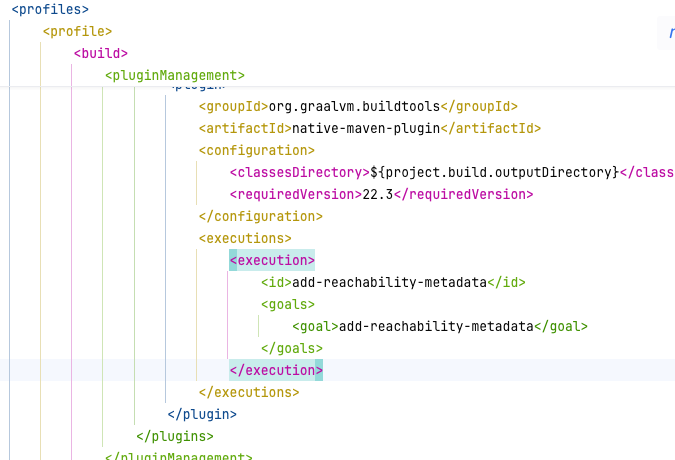
> And the execution is defined in the pluginManagement section of the native profile that is provided above:
>
>
>
> 
These hints will be part of our final native image build.
### Paketo Buildpacks (Native Run)
#### Dry Run
Cloud Native Buildpacks are a standard way to package applications for deployment. They provide a consistent and secure way to build OCI images.
Spring Boot 3 applications can be built into native images using Paketo Buildpack for Spring Boot.
> **Tip:**
> References
>
>
>
> [Spring Boot Cloud Native Buildpacks](https://docs.spring.io/spring-boot/reference/packaging/container-images/cloud-native-buildpacks.html)
>
>
>
> [Paketo Buildpacks for Spring Boot GitHub](https://github.com/paketo-buildpacks/spring-boot)
With the native profile in place, we can now move on to building the native image through an initial dry run.
```SHELL
mvn -Pnative spring-boot:build-image -Djacoco.skip -DskipTests
```
We can see the buildpack for native image being used:
```LOG
[INFO] [creator] Paketo Buildpack for Native Image 5.15.0
[INFO] [creator] https://github.com/paketo-buildpacks/native-image
[INFO] [creator] Build Configuration:
[INFO] [creator] $BP_BINARY_COMPRESSION_METHOD Compression mechanism used to reduce binary size. Options: `none` (default), `upx` or `gzexe`
[INFO] [creator] $BP_NATIVE_IMAGE enable native image build
[INFO] [creator] $BP_NATIVE_IMAGE_BUILD_ARGUMENTS arguments to pass to the native-image command
[INFO] [creator] $BP_NATIVE_IMAGE_BUILD_ARGUMENTS_FILE a file with arguments to pass to the native-image command
[INFO] [creator] $BP_NATIVE_IMAGE_BUILT_ARTIFACT the built application artifact explicitly, required if building from a JAR
```
First hurdle, the build fails with the following error:
```LOG
[INFO] [creator] Fatal error: com.oracle.graal.pointsto.constraints.UnsupportedFeatureException: An object of type 'ch.qos.logback.classic.Logger' was found in the image heap. This type, however, is marked for initialization at image run time for the following reason: classes are initialized at run time by default.
[INFO] [creator] This is not allowed for correctness reasons: All objects that are stored in the image heap must be initialized at build time.
[INFO] [creator]
```
Now that we have the initial dry run, let's move on to debugging, providing the right hints, and configuration to the Spring Boot Paketo Buildpack for Native Image.
> **Tip:**
> Note
>
>
>
> This dry run actually failed due to the missing reachability metadata goal that I overlooked. Check the Common Pitfalls section above.
#### Customizing the Spring Boot Maven Plugin
Let's start by customizing the Maven Spring Boot plugin to suit our needs for the native image build and try to get it to work with Logback, etc.
In the native profile, let's pass environment variables to the buildpack:
```XML
native
org.apache.maven.plugins
maven-jar-plugin
true
org.springframework.boot
spring-boot-maven-plugin
23
true
-O0
app-native-build
process-aot
process-aot
local
build-image-no-fork
org.graalvm.buildtools
native-maven-plugin
${project.build.outputDirectory}
22.3
add-reachability-metadata
add-reachability-metadata
```
> **Tip:**
> References
>
>
>
> Check the environment variables that are used in the profile for the native image buildpack: Some are already provided when you build with the native profile. Check the Spring Boot buildpack behavior. -O0 is used to disable optimizations, suitable for development.
>
>
>
> [Paketo Buildpacks Native Image GitHub](https://github.com/paketo-buildpacks/native-image)
>
>
>
> [Spring Boot Paketo Buildpacks GitHub](https://github.com/paketo-buildpacks/spring-boot)
#### Debugging the Build
After correcting the reachability metadata issue, the build is now successful.
Now the context is failing to launch due to missing reflection configuration.
```LOG
2025-02-15 17:31:34 Caused by: javax.xml.transform.TransformerException: com.sun.org.apache.xpath.internal.functions.FuncNormalizeSpace.()
```
> **Tip:**
> References
>
>
>
> Similar case on Stack Overflow [GraalVM XML Issue on StackOverflow](https://stackoverflow.com/questions/65455908/graalvm-xml-issue)
Let's start debugging the built image and provide the necessary hints to get the application context to start.
### Trace Agent with Paketo Buildpacks JVM Build
The trace agent is a tool that can be used to collect runtime information from the application.
Let's configure a regular JVM profile for a source-to-image build and instrument it with the trace agent:
```SHELL
mvn -Pjvm package -Djacoco.skip -DskipTests -DskipNativeTests=true
```
#### JVM Profile
```XML
jvm
org.apache.maven.plugins
maven-jar-plugin
org.springframework.boot
spring-boot-maven-plugin
build-image-no-fork
23
false
-agentlib:native-image-agent=config-output-dir=/iqbal-output-dir-{pid}-{datetime}/
app-jvm-build
```
#### JVM AOT Profile
Even better, let's make an AOT-instrumented Spring Boot Docker image to get metadata that is tailored to the application's runtime active Spring profiles:
```XML
jvm-aot
org.apache.maven.plugins
maven-jar-plugin
org.springframework.boot
spring-boot-maven-plugin
process-aot
process-aot
local
build-image-no-fork
paketobuildpacks/builder-jammy-buildpackless-base
paketobuildpacks/graalvm
paketobuildpacks/java
23
JDK
false
true
-agentlib:native-image-agent=config-output-dir=/tmp/trace-agent/config-{pid}-{datetime}/
false
app-jvm-aot
```
Let's go through some of the XML tags used in the profile:
```XML
paketobuildpacks/builder-jammy-buildpackless-base
paketobuildpacks/graalvm
paketobuildpacks/java
```
> **Tip:**
> References
>
>
>
> These tags will allow us to use GraalVM as a JVM rather than a native image builder as described in [Build Spring Boot App into Native Executable](https://www.graalvm.org/latest/reference-manual/native-image/guides/build-spring-boot-app-into-native-executable/)
This setup will allow us to collect metadata from the instrumented Spring Boot AOT-enabled app.
At the time of writing, the default Paketo Jammy builders only supported ARM64 for the tiny variant. I am using the base variant to stick to amd64 architecture.
I had issues with the tiny variant and the Mac's ARM64 architecture that seem linked to:
> **Tip:**
> References
>
>
>
> [Docker Roadmap Issue #384 - Comment 1449490313](https://github.com/docker/roadmap/issues/384#issuecomment-1449490313)
>
>
>
> [Docker Roadmap Issue #384 - Comment 1386018839](https://github.com/docker/roadmap/issues/384#issuecomment-1386018839)
##### Enable the Trace Agent
```XML
-agentlib:native-image-agent=config-output-dir=/tmp/trace-agent/config-{pid}-{datetime}/
```
To append to the JAVA_TOOL_OPTIONS environment variable at runtime, use the tags above.
> **Warning:**
> Note
>
>
>
> 1. There is an actual space between BPE_DELIM_JAVA_TOOL_OPTIONS tags.
>
>
>
> 2. You need to have write access to the config output directory in the Docker image. Otherwise, Java will throw a > `java.nio.file.AccessDeniedException`. > > That's why I'm using `/tmp/*`
> **Tip:**
> Docker Exec
>
>
>
> By default, the buildpack uses the tiny variant, which strips out `bash` & `sh` from the image.
>
>
>
> We'll switch the builder to the base variant to be able to run the image and debug it.
> **Tip:**
> References
>
>
>
> Check customization documentation for regular JVM builds: [Spring Boot Build Image Documentation](https://docs.spring.io/spring-boot/maven-plugin/build-image.html#build-image)
Build with the JVM AOT profile:
```SHELL
mvn -Pjvm-aot package
```
Run the Docker image to expose the port for running a couple of queries against your build and collect metadata from the trace agent.
In this example, we mounted the collected data from the container on the host machine under `$(pwd)/tmp`:
```SHELL
docker run -p 8080:8080 -v $(pwd)/tmp:/tmp:z app-jvm-aot
```
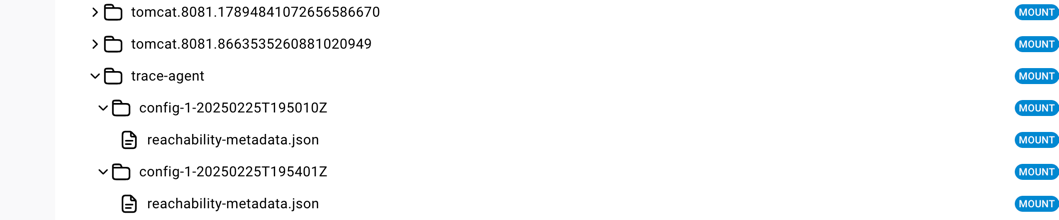
You can now inspect the trace agent output in the `/tmp` directory:
#### Trace Agent Output
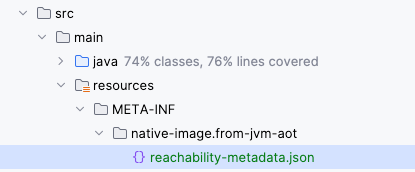
You can add the generated `reachability-metadata.json` to the native image build just by adding it under the `src/main/resources/META-INF/native-image` directory.
You can use a namespace of your choice, as in this example `from-jvm-aot`:
Similar to the previous article where we used the Native Build Tools plugin, I still needed to supplement custom hints to get to a successful context launch and weed out runtime errors.
I had to cherry-pick some reflection and resource configurations from the agent run and include them in the native image build for some custom POJOs as well as JAXB.
It looks like XSDs that reference others are not being picked up by the agent, which you can resolve by providing, for example:
```JSON
"resources": [
{
"glob": "path/to/xsd/files/*"
}
],
```
and some POJOs which the agent effectively picked up, but I still had to loosen up the reflection configuration for them:
Here is an example for this case:
```JSON
{
"type": "com.myapp.MyJacksonSerializedPojo",
"allDeclaredConstructors": true,
"allPublicConstructors": true,
"allDeclaredMethods": true,
"allPublicMethods": true
},
```
> **Note:**
> Note
>
>
>
> There has been a change in the way the agent collects metadata.
>
>
>
> You can see the difference between the previous article [Road to Native Image for Spring Boot 3](road-to-native-image-spring-boot-3.html) and this one.
>
>
>
> You can combine all dynamic elements now under a single `reachability-metadata.json` file that has a section for reflection, resources, proxies, JNI, and serialization.
>
>
>
> Another point to note is that the process is less tedious and support has improved a lot between this article and the previous one, so much so that these were the only changes I had to make to get to a full context launch.
> **Tip:**
> References
>
>
>
> Check the previous article for more details on supplementing custom hints: [Road to Native Image for Spring Boot 3 Debugging Section](road-to-native-image-spring-boot-3.html#debugging-the-native-image)
#### Spring Context Launch Succeeds
After adding the necessary hints, the context launches successfully:
```LOG
2025-02-28T19:49:42.339Z INFO 1 --- [ main] com.myapp.MainApplication : Started MainApplication in 0.898 seconds (process running for 0.902)
```
We'll cover more practical debugging and runtime issues next.
### Debugging the Native Image
Getting to a context launch is half the battle.
Though some POJOs used in JSON serialization/deserialization were picked up by the trace agent, I still had to loosen reflection configurations in bulk for serialization and deserialization to work.
At this time, unfortunately, there is no support for wildcards for packages in the `reachability-metadata.json` file, so you have to list each class individually.
Let's make use of IntelliJ's JSONPath Plugin to bulk change reflection configuration:
For instance, you can pull all classes ending in `Impl` under the package `com.myapp.x.y`:
```
$.reflection[?(@.type =~ /^.*com\.myapp\.x\.y\..*Impl$/)]
```
and add looser reflection configurations for them:
```JSON
{
"type": "com.myapp.x.y.MyImpl",
"allDeclaredConstructors": true,
"allPublicConstructors": true,
"allDeclaredMethods": true,
"allPublicMethods": true
}
```
> **Tip:**
> References
>
>
>
> Wildcard support for packages is being discussed in the GraalVM community: [GraalVM Wildcard Package Support Discussion](https://github.com/oracle/graal/issues/1236)