# Road to Native Image (Spring Boot 3+)
> **TL;DR**
> Migrate a Spring Boot 3+ app with Spring Cloud and Spring Cloud AWS to GraalVM Native Image: configure AOT processing, add the native Maven plugin, run the Native Image agent to collect reflection metadata, and debug missing resources, bundles, and JNI config at runtime.
This guide details the process of migrating a Spring Boot application to GraalVM Native Image.
The application integrates Spring Cloud and Spring Cloud AWS. Be prepared for potential runtime errors and the need for manual adjustments during the image-building process.
For this guide, I used the GraalVM Native Build Tool directly. Other approaches, such as converting the JAR directly or using Paketo Buildpacks, are not covered.
## Upgrading to a Native-Compatible Setup
First, upgrade to the latest versions of Spring Boot 3.x.x, Spring Cloud, and Spring Cloud AWS on which the application depends.
Make sure to check the compatibility matrix for these dependencies:
| Dependency | Used version | Compatibility Matrix |
| --- | --- | --- |
| Java | 23 | N/A |
| GraalVM | Oracle GraalVM 23.0.1+11.1 | N/A |
| Spring Boot | 3.4.1 | N/A |
| Spring Cloud | 2024.0.0 | [Spring Cloud Project](https://spring.io/projects/spring-cloud) |
| Spring Cloud AWS | 3.3.0-RC1 | [Spring Cloud AWS GitHub Repository](https://github.com/awspring/spring-cloud-aws) |
In this case, upgrading was straightforward since the Spring Boot 2 to 3 upgrade was already completed.
Simply update the versions and run integration and regression tests to ensure the service remains intact.
## Enable Native Support
Now that you're running on compatible versions, set up your project for Ahead-of-Time (AOT) processing and native image building.
If you are using the Spring Boot parent starter, a native profile is already included. The following setup demonstrates manually adding the profile in case you have a custom parent POM.
### Spring AOT
#### Introduction
The goal of Spring AOT Compilation is to provide GraalVM with the necessary metadata for Spring's dynamic features.
These features, previously processed at runtime, need to be initialized during compile time for native images.
AOT processing provides:
1. Source code for bean definitions at build time.
2. Bytecode for dynamic proxies.
3. Hint files for:
* Reflective access metadata.
* Serialization metadata.
* Resources to include.
* Proxy configuration.
#### Handling profiles and Conditional bean creation
Feeding all dynamic aspects into GraalVM during native image build would undermine the goal of maintaining a clean runtime:
* It increases size, negating benefits like reduced footprint and optimization.
* It compromises a reduced attack surface, as runtime wouldn't be restricted to a profile or tailored for specific properties.
As a result, building native images introduces restrictions on profiles and conditional bean loading (e.g., `@Conditional`). The application context during AOT compilation mirrors the build-time configuration.
#### In Practice
Add the AOT plugin to your POM:
```XML
org.springframework.boot
spring-boot-maven-plugin
process-aot
process-aot
local
```
> **Note:**
> Specify target profiles as shown above. For example, the "local" profile provides quick feedback from the generated binary.
You can run only Spring AOT with:
```SHELL
mvn spring-boot:process-aot
```
Inspect:
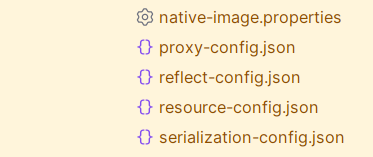
* GraalVM hints under `target/spring-aot/main/resources/META-INF/native-image/com.myapp.business/myapp/*`:
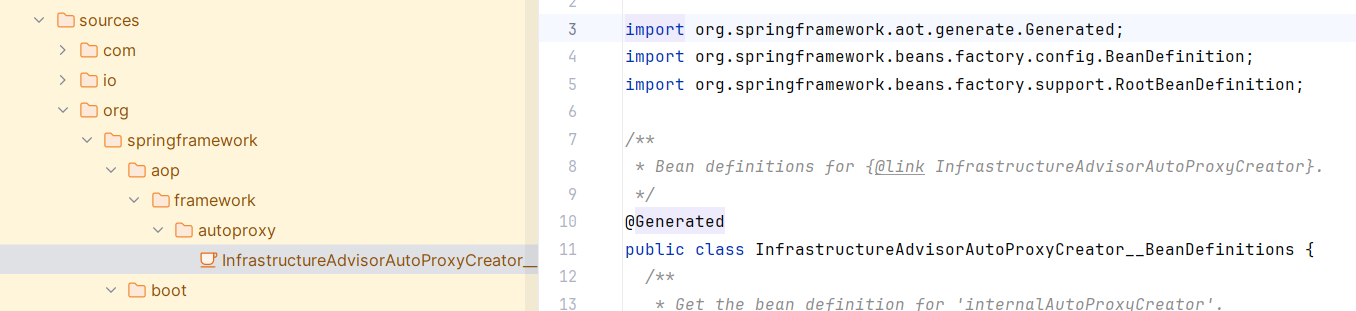
* Generated source code under `target/spring-aot/main/sources`:
### GraalVM Native Build Tools
This project will provide you with a Maven plugin to support building the native image via Maven (or Gradle).
There are useful flags, for instance, to speed up development and ignore some optimizations GraalVM applies to the artifact.
You can also pass args to the native-image command directly as you'll see below.
Check the full documentation for references.
For the basic setup, add to the POM:
```XML
org.graalvm.buildtools
native-maven-plugin
-Ob
${project.build.outputDirectory}
22.3
executable-name
false
true
true
build-native
compile-no-fork
package
test-native
test
test
add-reachability-metadata
add-reachability-metadata
```
> **Note:**
> The `-Ob` argument passed will help us build native images faster during the development phase.
>
>
>
> Check the `Use Quick Build Mode for Faster Builds` section in the official documentation under:
>
>
>
> [GraalVM Native Image Build Output Reference](https://www.graalvm.org/latest/reference-manual/native-image/overview/BuildOutput/#stage-compiling)
> **Note:**
> Specify `classesDirectory`, otherwise the native image plugin cannot find the classes.
> **Tip:**
> Include an execution for the add-reachability-metadata goal.
>
>
>
> This allows GraalVM to fetch metadata for known third-party libraries.
>
>
>
> See [Oracle GraalVM Reachability Metadata Repository](https://github.com/oracle/graalvm-reachability-metadata).
>
>
>
> You can read more on this.
In [Known Limitations of Native Image Packaging](https://docs.spring.io/spring-boot/reference/packaging/native-image/advanced-topics.html#packaging.native-image.advanced.known-limitations).
### Native profile
Let's combine under a profile called native so that both steps run when we package the application:
```XML
native
org.apache.maven.plugins
maven-jar-plugin
true
org.springframework.boot
spring-boot-maven-plugin
process-aot
process-aot
local
org.graalvm.buildtools
native-maven-plugin
-Ob
--initialize-at-run-time=sun.net.dns.ResolverConfigurationImpl
${project.build.outputDirectory}
22.3
executable-name
false
true
false
true
build-native
compile-no-fork
package
test-native
test
test
add-reachability-metadata
add-reachability-metadata
```
## Building the image
Let's run with this minimum setup and try to figure out the problems that come along.
```BASH
mvn -Pnative package -DskipTests
```
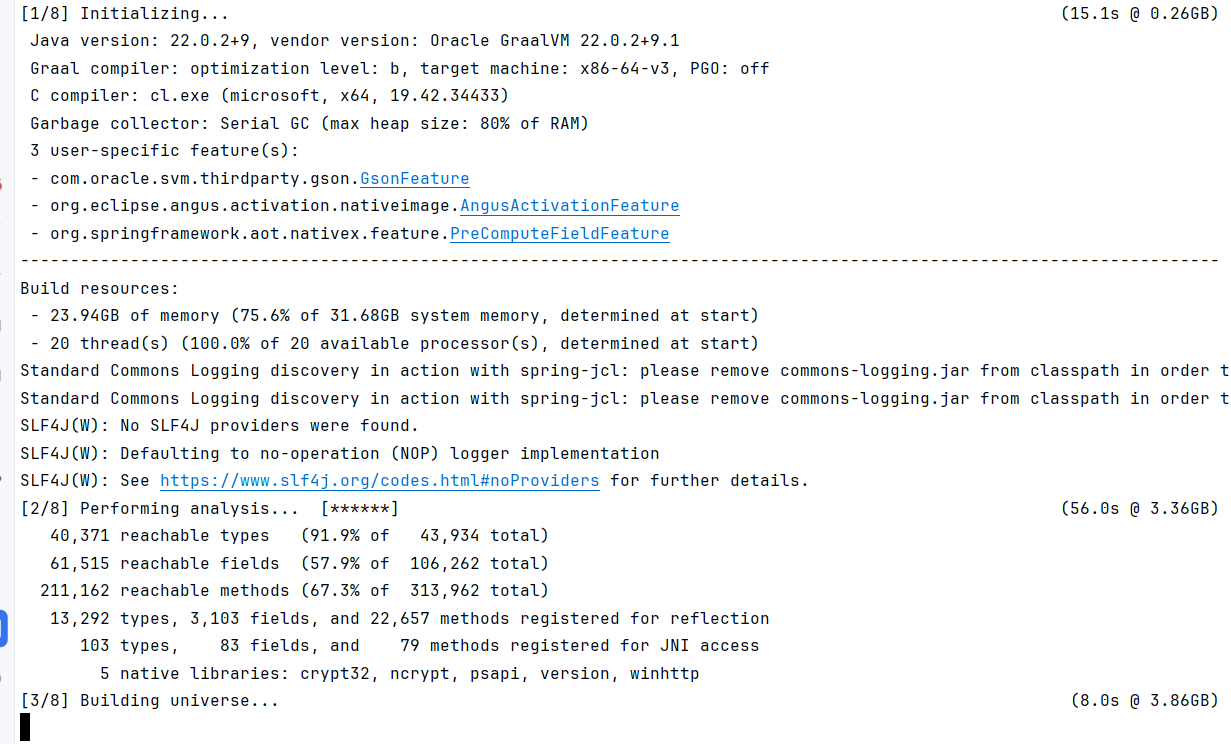
After the build is finished, Native Image provides you with a binary that you can run:
```SHELL
spring_profiles_active=local ./target/executable-name.exe
```
> **Note:**
> `executable-name` is customizable in the plugin.
>
>
>
> `executable-name`
## Using the agent
My initial build fails to launch the Spring application context.
You can supply your own metadata during the image build.
Let's make use of the Native Image agent to get the metadata directly from a JVM run of the application!
### Running The Native Agent During Tests
What we will do in this section is to run tests in JVM mode and use the agent to collect metadata from those tests.
We can specifically skip just the native tests in that case with `-DskipNativeTests`.
Let's set up the agent to run along JVM unit tests.
```SHELL
mvn clean install -Pnative package -DskipTests=false -DskipNativeTests=true -Djacoco.skip=true
```
I'm skipping JaCoCo as it looks like the generated sources from AOT are counting towards coverage and causing it to fail.
Let's plug in the agent, see the native build tool section under the native profile:
```XML
true
```
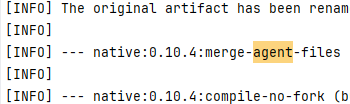
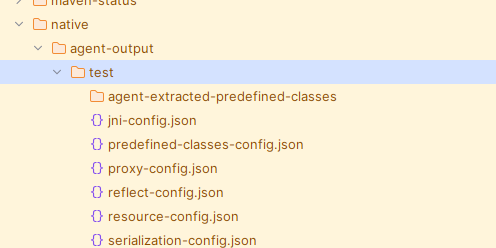
When rerunning our native build, you can see console output merging agent metadata during image build:
Generated hints collected during test runs:
> **Warning:**
> There is a downside of following this approach since you are collecting metadata from tests, chances are you are more likely oversupplying metadata.
>
>
>
> Test metadata, for instance, might supply elements from the testing infrastructure.
>
>
>
> You can run the agent alongside the application itself for a scenario that is much closer to production.
>
>
>
> After checking the agent output running on tests, I've decided it's not worth polluting the image, so I will be using the agent on an actual application run.
### Running The Native Agent
In this phase, we'll collect metadata with the help of the agent by running:
```SHELL
spring_profiles_active=local java -agentlib:native-image-agent=config-output-dir=agent-run-config -jar target/app-1.1.jar
```
I only collected up to context launch, but you should keep running it, exercising different paths according to how the application runs in production.
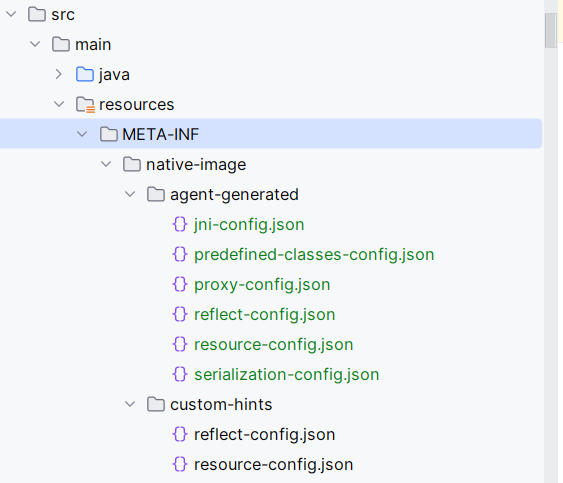
The agent generates files in the specified directory which you can copy under `src/main/resources/META-INF/` for the plugin to pick them up during the next build:
## Debugging the native image
With this initial setup, Spring's application context fails to launch due to:
* missing reflection configuration
* missing resources
* missing JNI config
I had to cherry-pick reflection and resource configurations from the agent run and include them in the native image builds for some custom POJOs as well as JAXB.
You can use JSONPath to only get the metadata you need.
```
$[?(@.name && @.name contains 'com.app.xml.annotated.pojos')]
$[?(@.name && @.name contains 'org.glassfish.jaxb.runtime.v2.runtime')]
$[?(@.name && @.name contains 'com.sun.org.apache.xerces.internal')]
```
> **Tip:**
> IntelliJ's JSONPath plugin was quite handy:
>
>
>
> [JSONPath Plugin for IntelliJ IDEA](https://plugins.jetbrains.com/plugin/22044-jsonpath)
The AOT process is not flawless. Here is how to provide your own hints.
> **Tip:**
> Providing your own hints.
>
>
>
> [Custom Hints for Native Image](https://docs.spring.io/spring-boot/reference/packaging/native-image/advanced-topics.html#packaging.native-image.advanced.custom-hints)
### XML Linked Issues
```JAVA_STACKTRACE
```javastacktrace
2025-01-01T10:36:15.879+01:00 WARN 39400 --- [ main] w.s.c.ServletWebServerApplicationContext : Exception encountered during context initialization - cancelling refresh attempt: org.springframework.beans.factory.BeanCreationException: Error creating bean with name 'annotationActionEndpointMapping': Instantiation of supplied bean failed
Application run failed
org.springframework.beans.factory.BeanCreationException: Error creating bean with name 'annotationActionEndpointMapping': Instantiation of supplied bean failed
at org.springframework.beans.factory.support.AbstractAutowireCapableBeanFactory.obtainFromSupplier(AbstractAutowireCapableBeanFactory.java:1245)
at org.springframework.beans.factory.support.AbstractAutowireCapableBeanFactory.createBeanInstance(AbstractAutowireCapableBeanFactory.java:1182)
at org.springframework.beans.factory.support.AbstractAutowireCapableBeanFactory.java:523)
at org.springframework.beans.factory.support.DefaultSingletonBeanRegistry.getSingleton(DefaultSingletonBeanRegistry.java:289)
...
at com.app.myApplication.main(myApplication.java:28)
at java.base@22.0.2/java.lang.invoke.LambdaForm$DMH/sa346b79c.invokeStaticInit(LambdaForm$DMH)
Caused by: org.springframework.xml.xpath.XPathParseException: Could not compile [normalize-space(wsa:To)] to a XPathExpression: javax.xml.transform.TransformerException: com.sun.org.apache.xpath.internal.functions.FuncNormalizeSpace.()
at org.springframework.xml.xpath.Jaxp13XPathExpressionFactory.createXPathExpression(Jaxp13XPathExpressionFactory.java:82)
at org.springframework.xml.xpath.XPathExpressionFactory.createXPathExpression(XPathExpressionFactory.java:72)
at org.springframework.ws.soap.addressing.version.AbstractAddressingVersion.createNormalizedExpression(AbstractAddressingVersion.java:115)
at org.springframework.ws.soap.addressing.version.AbstractAddressingVersion.(AbstractAddressingVersion.java:89)
...
... 18 more
Caused by: javax.xml.xpath.XPathExpressionException: javax.xml.transform.TransformerException: com.sun.org.apache.xpath.internal.functions.FuncNormalizeSpace.()
at java.xml@22.0.2/com.sun.org.apache.xpath.internal.jaxp.XPathImpl.compile(XPathImpl.java:174)
at org.springframework.xml.xpath.Jaxp13XPathExpressionFactory.createXPathExpression(Jaxp13XPathExpressionFactory.java:78)
... 44 more
Caused by: javax.xml.transform.TransformerException: com.sun.org.apache.xpath.internal.functions.FuncNormalizeSpace.()
at java.xml@22.0.2/com.sun.org.apache.xpath.internal.compiler.FunctionTable.getFunction(FunctionTable.java:353)
at java.xml@22.0.2/com.sun.org.apache.xpath.internal.compiler.Compiler.compile(FunctionTable.java:106)
at java.xml@22.0.2/java.base@22.0.2/java.lang.invoke.LambdaForm$DMH/sa346b79c.invokeStaticInit(LambdaForm$DMH)
...
```
I've added a custom hint under `src/main/resources/META-INF/native-image/custom-hints/reflect-config.json`.
```JSON
[
{
"name": "com.sun.org.apache.xpath.internal.functions.FuncNormalizeSpace",
"methods": [
{
"name": "",
"parameterTypes": []
}
]
}
]
```
> **Tip:**
> I found a StackOverflow thread for this specific missing hint [GraalVM XML Issue - Stack Overflow](https://stackoverflow.com/questions/65455908/graalvm-xml-issue).
### Missing Bundle
```JAVA_STACKTRACE
Caused by: java.lang.ExceptionInInitializerError
at org.glassfish.jaxb.runtime.v2.ContextFactory.createContext(ContextFactory.java:241)
at org.glassfish.jaxb.runtime.v2.JAXBContextFactory.createContext(JAXBContext.java:58)
at jakarta.xml.bind.ContextFinder.find(ContextFinder.java:322)
at jakarta.xml.bind.JAXBContext.newInstance(JAXBContext.java:392)
... 69 more
Caused by: java.util.MissingResourceException: Can't find bundle for base name org.glassfish.jaxb.core.v2.Messages, locale en_GB
at java.base@22.0.2/java.util.ResourceBundle.throwMissingResourceException(ResourceBundle.java:205)
... 95 more
```
You can provide the missing bundle in your custom `resource-config.json`:
```JSON
...
"bundles":[
{
"name": "org.glassfish.jaxb.core.v2.Messages",
"locales":["en-GB"]
}
]
```
### Missing resources
```JAVA_STACKTRACE
Caused by: java.lang.IllegalStateException: Could not load 'class path resource [org/springframework/ws/transport/http/MessageDispatcherServlet.properties]': class path resource [org/springframework/ws/transport/http/MessageDispatcherServlet.properties] cannot be opened because it does not exist
at org.springframework.ws.support.DefaultStrategiesHelper.(DefaultStrategiesHelper.java:78)
at org.springframework.ws.support.DefaultStrategiesHelper.(DefaultStrategiesHelper.java:88)
at org.springframework.ws.transport.http.MessageDispatcherServlet.(MessageDispatcherServlet.java:175)
at org.springframework.ws.transport.http.MessageDispatcherServlet.(MessageDispatcherServlet.java:129)
at org.springframework.boot.autoconfigure.webservices.WebServicesAutoConfiguration.messageDispatcherServlet(WebServicesAutoConfiguration.java:72)
at org.springframework.boot.autoconfigure.webservices.WebServicesAutoConfiguration__BeanDefinitions.lambda$getMessageDispatcherServletInstanceSupplier$0(WebServicesAutoConfiguration__BeanDefinitions.java:32)
```
This one was straightforward. Let's include the missing resource:
I've added a custom hint under `src/main/resources/META-INF/native-image/custom-hints/resource-config.json`.
```JSON
{
"resources": {
"includes": [
{
"pattern": "\\Qorg/springframework/ws/transport/http/MessageDispatcherServlet.properties\\E"
}
]
}
}
```
> **Tip:**
> I came across a bug already open for the above error [Native image running error with Spring Boot 3.1 application - GitHub Issue #8429](https://github.com/oracle/graal/issues/8429).
### Netty issues
```JAVA_STACKTRACE
2025-01-03T14:42:02.819+01:00 INFO 33628 --- [ main] o.apache.catalina.core.StandardService : Stopping service [Tomcat]
Application run failed
org.springframework.beans.factory.BeanCreationException: Error creating bean with name 'lettuceClientResources': Instantiation of supplied bean failed
at org.springframework.beans.factory.support.AbstractAutowireCapableBeanFactory.obtainFromSupplier(AbstractAutowireCapableBeanFactory.java:1245)
at org.springframework.beans.factory.support.AbstractAutowireCapableBeanFactory.java:1182)
...
at com.app.MainApplication.main(MainApplication.java:28)
at java.base@23.0.1/java.lang.invoke.LambdaForm$DMH/sa346b79c.invokeStaticInit(LambdaForm$DMH)
Caused by: java.lang.ExceptionInInitializerError
at io.netty.resolver.dns.DnsServerAddressStreamProviders$DefaultProviderHolder$1.provider(DnsServerAddressStreamProviders.java:150)
at io.netty.resolver.dns.DnsServerAddressStreamProviders$DefaultProviderHolder$1.(DnsServerAddressStreamProviders.java:130)
at io.netty.resolver.dns.DnsNameResolverBuilder.(DnsNameResolverBuilder.java:71)
at io.lettuce.core.resource.AddressResolverGroupProvider$DefaultDnsAddressResolverGroupWrapper.(AddressResolverGroupProvider.java:56)
...
... 20 more
```
Add to the native image plugin, to force initialization until runtime ( see [Native Profile](#native-profile)):
```SHELL
--initialize-at-run-time=sun.net.dns.ResolverConfigurationImpl
```
And you also need to provide a JNI config for:
```JAVA_STACKTRACE
Application run failed
org.springframework.beans.factory.BeanCreationException: Error creating bean with name 'lettuceClientResources': Instantiation of supplied bean failed
at org.springframework.beans.factory.support.AbstractAutowireCapableBeanFactory.obtainFromSupplier(AbstractAutowireCapableBeanFactory.java:1245)
at org.springframework.beans.factory.support.AbstractAutowireCapableBeanFactory.java:1182
at org.springframework.beans.factory.support.AbstractBeanFactory.lambda$doGetBean$0(AbstractBeanFactory.java:336)
at org.springframework.beans.factory.support.DefaultSingletonBeanRegistry.getSingleton(DefaultSingletonBeanRegistry.java:289)
...
at com.app.MainApplication.main(MainApplication.java:28)
at java.base@23.0.1/java.lang.invoke.LambdaForm$DMH/sa346b79c.invokeStaticInit(LambdaForm$DMH)
Caused by: java.lang.NoSuchFieldError: sun.net.dns.ResolverConfigurationImpl.os_searchlist
at org.graalvm.nativeimage.builder/com.oracle.svm.core.jni.functions.JNIFunctions$Support.getFieldID(JNIFunctions.java:1867)
at org.graalvm.nativeimage.builder/com.oracle.svm.core.jni.functions.JNIFunctions.GetStaticFieldID(JNIFunctions.java:467)
at java.base@23.0.1/sun.net.dns.ResolverConfigurationImpl.init0(Native Method)
...
```
Adding these to `jni-config.json`:
```JSON
[
{
"name": "sun.net.dns.ResolverConfigurationImpl",
"fields": [
{
"name": "os_searchlist"
},
{
"name": "os_nameservers"
}
]
}
]
```
## Spring Context Launches
After going through the debugging section, I was able to get the Spring application context to launch!
```LOG
2025-01-03T15:19:11.080+01:00 INFO 39192 --- [ main] com.app.MainApplication : Started MainApplication in 0.346 seconds (process running for 0.357)
```
> **Tip:**
> References
>
>
>
> [How to use AOT Processing in Spring Boot](https://docs.spring.io/spring-boot/how-to/aot.html)
>
>
>
> [Spring Boot AOT Packaging Reference](https://docs.spring.io/spring-boot/reference/packaging/aot.html#page-title)
>
>
>
> [Understanding AOT Processing for GraalVM Native Images](https://docs.spring.io/spring-boot/reference/packaging/native-image/introducing-graalvm-native-images.html#packaging.native-image.introducing-graalvm-native-images.understanding-aot-processing)
>
>
>
> [Spring Boot Maven Plugin - AOT](https://docs.spring.io/spring-boot/maven-plugin/aot.html#page-title)
>
>
>
> [Key Differences with JVM Deployments](https://docs.spring.io/spring-boot/reference/packaging/native-image/introducing-graalvm-native-images.html#packaging.native-image.introducing-graalvm-native-images.key-differences-with-jvm-deployments)
>
>
>
> [GraalVM Native Build Tools - Maven Plugin Documentation](https://graalvm.github.io/native-build-tools/latest/maven-plugin.html)
>
>
>
> [Oracle GraalVM Reachability Metadata Repository](https://github.com/oracle/graalvm-reachability-metadata)
>
>
>
> [Known Limitations of Native Image Packaging](https://docs.spring.io/spring-boot/reference/packaging/native-image/advanced-topics.html#packaging.native-image.advanced.known-limitations)
>
>
>
> [GraalVM XML Issue - Stack Overflow](https://stackoverflow.com/questions/65455908/graalvm-xml-issue)
>
>
>
> [JSONPath Plugin for IntelliJ IDEA](https://plugins.jetbrains.com/plugin/22044-jsonpath)
>
>
>
> [Custom Hints for Native Image](https://docs.spring.io/spring-boot/reference/packaging/native-image/advanced-topics.html#packaging.native-image.advanced.custom-hints)
>
>
>
> [Stack Overflow: java.lang.NoClassDefFoundError: Could not initialize class io.lettuce.core.resource.DefaultClientResources](https://stackoverflow.com/questions/79010693/java-lang-noclassdeffounderror-could-not-initialize-class-io-lettuce-core-resource)
>
>
>
> [Spring Framework Issue #29688](https://github.com/spring-projects/spring-framework/issues/29688)
>
>
>
> [Spring Data Redis Issue #2480](https://github.com/spring-projects/spring-data-redis/issues/2480)
>
>
>
> [Spring Cloud Project](https://spring.io/projects/spring-cloud)
>
>
>
> [Spring Cloud AWS GitHub Repository](https://github.com/awspring/spring-cloud-aws)
>
>
>
> [GraalVM Native Image Build Output Reference](https://www.graalvm.org/latest/reference-manual/native-image/overview/BuildOutput/#stage-compiling)
>
>
>
> [Native image running error with Spring Boot 3.1 application - GitHub Issue #8429](https://github.com/oracle/graal/issues/8429)